
Many service problems are not visible at first.
A customer may see a delay, a confusing message, a broken flow, or a poor support experience.
But behind that visible problem, there is usually a much larger system:

- People
- Processes
- Tools
- Policies
- Channels
- Handoffs
- Operational decisions
That is why service blueprint is such a useful tool.
It helps teams understand not only what the customer experiences, but also what needs to happen behind the scenes for that experience to work.
In service design, this matters a lot.
Because a good service is not created only at the interface level.
It is created across the entire system that supports the customer journey.
What is a service blueprint?
A service blueprint is a visual tool used to map how a service is delivered to customers.
It helps teams understand:
- What the customer does
- What the team does in front of the customer
- What happens behind the scenes
- Which systems support the service
- Where the main touchpoints, gaps, and opportunities are
In simple terms:
A customer journey shows what the customer experiences.
A service blueprint shows what the organization must do to deliver that experience.
That difference is important.
A customer journey map is excellent for understanding the user’s perspective.
A service blueprint goes further by connecting the user’s experience with the internal operations that make the service possible.
What a service blueprint is usually used for
A service blueprint can be used in two main ways.
First, to understand how a service works today.
Second, to design how the service should work in the future.
This makes it useful for both diagnosis and design.
Teams often use service blueprints to:
- Analyze existing services
- Identify bottlenecks
- Visualize operational complexity
- Improve customer experience
- Align teams around service delivery
- Redesign internal processes
- Define how a future service should operate
It is especially valuable when the service involves multiple teams, channels, or steps.
The main layers of a service blueprint
A service blueprint is usually composed of several layers.
The exact structure can vary depending on the team, but most blueprints include the following elements.
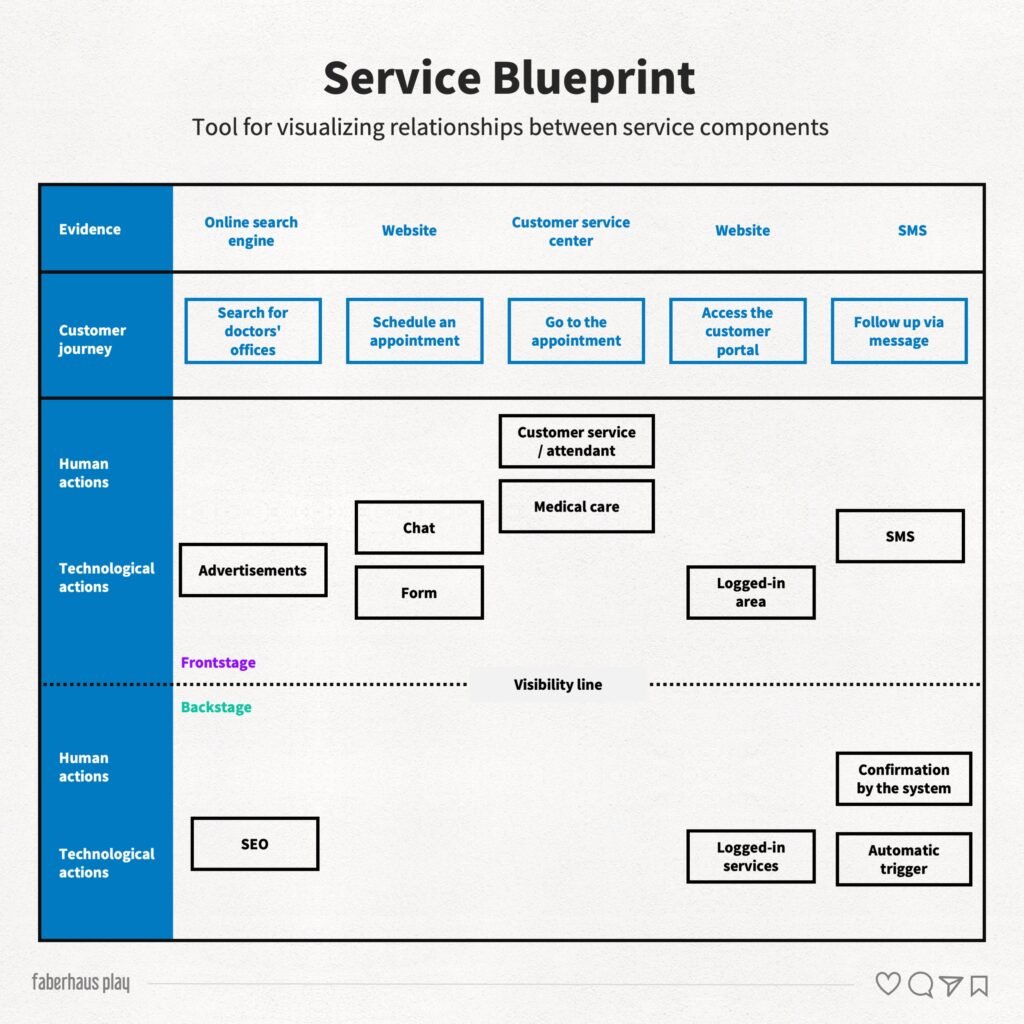
1. Customer actions
This layer shows what customers do during the service experience.
For example:
- Searching for information
- Booking an appointment
- Filling out a form
- Making a payment
- Contacting support
- Receiving a confirmation
- Using the service
- Giving feedback
This is where the service begins from the customer’s point of view.
2. Frontstage actions
Frontstage actions are the visible actions performed by the team or service provider.
These are the moments where the customer directly interacts with the organization.
Examples include:
- A receptionist welcoming a customer
- A support agent answering a chat
- An employee confirming a request
- An interface displaying information
- A salesperson explaining a solution
Frontstage actions shape the customer’s perception of the service.
3. Backstage actions
Backstage actions are the activities that happen behind the scenes.
The customer usually does not see them, but they are essential for the service to work.
Examples include:
- Processing a request
- Updating internal records
- Checking availability
- Approving a document
- Preparing an order
- Coordinating between teams
Many service failures happen in the backstage.
That is why mapping this layer is so important.
4. Physical or digital evidence
Evidence refers to the visible proof that the service is happening.
This may include:
- Emails
- Receipts
- Forms
- Notifications
- Contracts
- Signage
- Screens
- Packaging
- Waiting rooms
- Dashboards
- Confirmation messages
Evidence helps customers understand and trust the service.
Without clear evidence, people may feel lost, insecure, or unsure about what comes next.
5. Support processes and systems
This layer includes the infrastructure that supports service delivery.
For example:
- IT systems
- Internal tools
- Databases
- Training
- Policies
- Operational rules
- Logistics
- Management processes
This is where service design connects strongly with operations.
Because a service experience can only be as good as the system that supports it.
6. Lines of interaction and visibility
Service blueprints also use lines to show relationships between layers.
The line of interaction shows where customers interact directly with the service.
The line of visibility separates what customers can see from what happens behind the scenes.
These lines help teams understand where experience and operations meet.
And very often, that is where the most important design opportunities appear.
Why service blueprint matters
Service blueprint matters because it makes complexity visible.
Many teams discuss customer experience only from the surface:
- The app
- The website
- The message
- The support script
- The visual design
But customers experience the result of the whole system.
If internal processes are broken, the experience will eventually break too.
A beautiful interface cannot compensate for a poorly designed operation.
A friendly support team cannot fix a service that depends on confusing policies.
A good brand promise cannot survive a delivery process that consistently fails.
Service blueprint helps teams see those connections.
When to use a service blueprint
A service blueprint is especially useful when you need to:
- Analyze how a service currently works
- Design an ideal future service
- Visualize customer actions, team actions, and support processes
- Identify gaps in service delivery
- Find critical touchpoints
- Improve operational efficiency
- Align different teams
- Redesign complex experiences
It can be used at the beginning of a project, during discovery, after customer journey research, or when a team needs to move from insights to operational planning.
A simple step-by-step process
Step 1: collect the necessary information
Start by gathering inputs such as:
- Customer research
- Journey maps
- Interviews
- Personas
- Operational data
- Business analysis
- Market research
- Support reports
- Internal process documentation
A service blueprint should not be built only from assumptions.
It becomes stronger when it is based on real evidence.
Step 2: fill in the blueprint
Use the research to map:
- Customer actions
- Frontstage actions
- Backstage actions
- Evidence
- Touchpoints
- Support systems
- Operational processes
At this stage, the goal is not perfection.
The goal is shared understanding.
Step 3: prototype and test uncertain points
If there are doubts, prototype and test them.
This may include:
- Testing a new touchpoint
- Validating a communication flow
- Checking an operational process
- Simulating service delivery
- Testing a digital interaction with users
A blueprint should help teams discover what still needs to be validated.
Step 4: revisit and update the blueprint
A service blueprint is not a static document.
Services change.
Customer behavior changes.
Internal processes change.
Business priorities change.
That is why the blueprint should be revisited and updated whenever necessary.
For companies with multiple core services, it may be useful to create a specific blueprint for each major service.
For UX and service design teams, this is essential.
Because the quality of an experience is not defined only by what customers see.
It is also defined by everything the organization does to make that experience possible.
And once teams can see that system clearly, they can finally design it better.
Reference
EISE Lab. Retrieved from http://eiselab.com.br/